DNS Record Types Explained
Ever wondered how a browser knows where a website lives when you type a domain name and hit Enter?
Like…
You typed google.com
But computers don’t understand names.
They understand numbers.
So how does the browser figure out where google.com actually is?
That’s where DNS comes in.
Today, you’ll understand DNS and its record types in a very simple way.
No deep protocol talk, no scary terms, just clean mental models and real-life examples.
What is DNS?
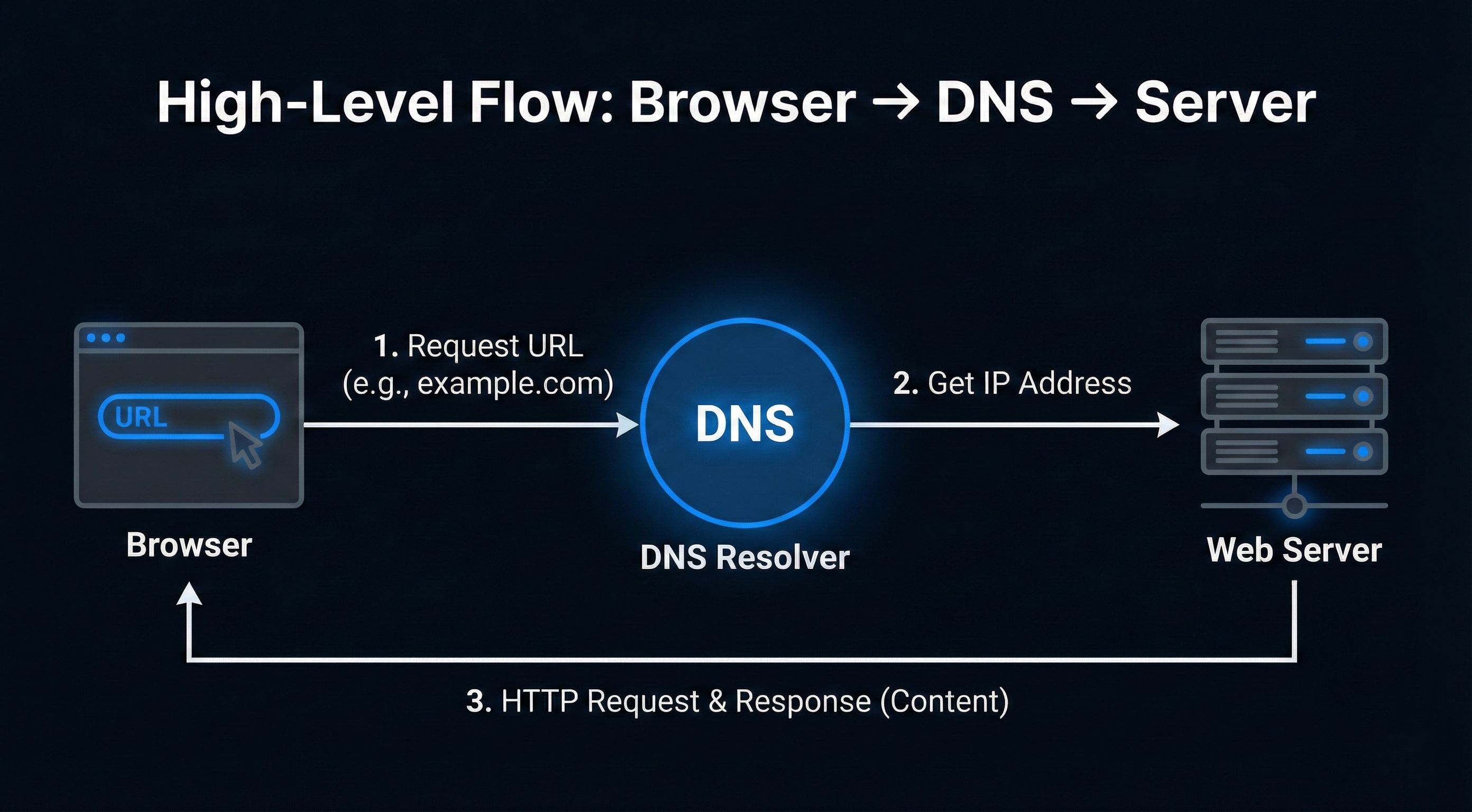
DNS (Domain Name System) is the phonebook of the internet.
You remember names like:
But the internet works with IP addresses like:
142.250.183.142607:f8b0:4009:80b::200e
So DNS answers one basic question:
“This name was asked… where does it live?”
Why DNS Records Are Needed
DNS itself is not one big list.
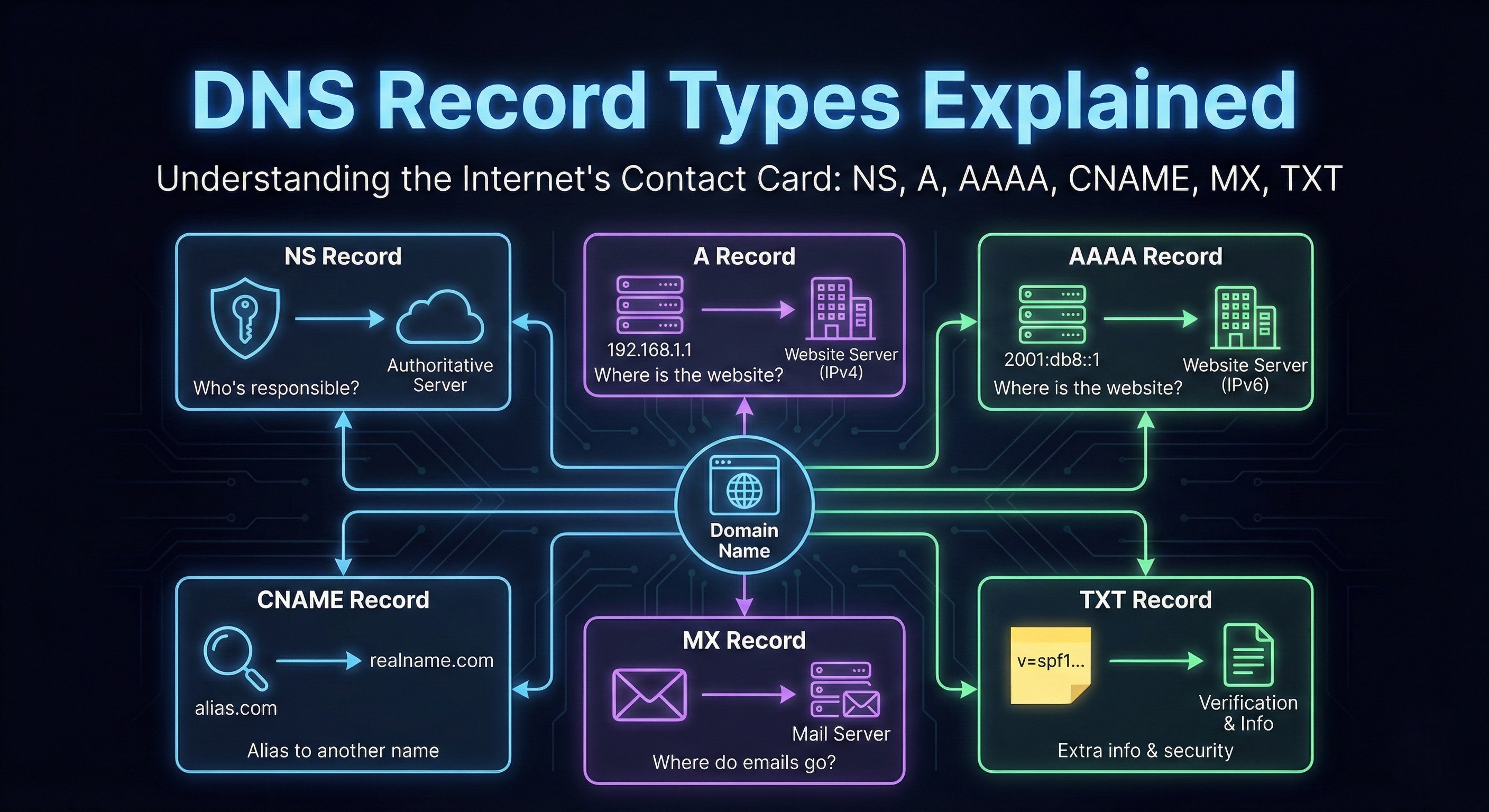
Instead, DNS is made of records, and each record solves a specific problem.
Think of DNS like a contact card for a domain:
Who manages this domain?
Where is the website hosted?
Where should emails go?
Any extra info or verification?
Each of these answers is stored as a DNS record.
Now let’s meet them one by one.
NS Record (Who Is Responsible for This Domain?)
NS = Name Server
This record answers:
“Who is in charge of this domain?”
Real-life example:
Imagine a house society.
The security desk doesn’t know every flat owner —
it only knows which building manager to ask.
That’s exactly what an NS record does.
For example:
example.com → ns1.cloudflare.com
Meaning:
“For anything related to example.com, ask Cloudflare’s servers.”
Without NS records:
DNS wouldn’t know where to ask
The lookup stops immediately
NS records are the starting point of DNS.
A Record: Domain Name → IPv4 Address
A = Address
This is the most important record for websites.
It answers:
“Where is the website server?”
Example:
example.com → 93.184.216.34
Real-life analogy:
Domain name = Person’s name
IP address = House address
When a browser gets this IP:
It knows exactly which server to contact
HTTP request can finally happen
A record maps a domain to an IPv4 address
AAAA Record: Domain Name → IPv6 Address
Same job as A record.
Only difference:
A record → IPv4
AAAA record → IPv6
Example:
example.com → 2606:2800:220:1:248:1893:25c8:1946
Why does this exist?
IPv4 addresses are running out
IPv6 gives a LOT more addresses
If a browser supports IPv6, it may prefer AAAA over A.
CNAME Record: One Name Points to Another Name
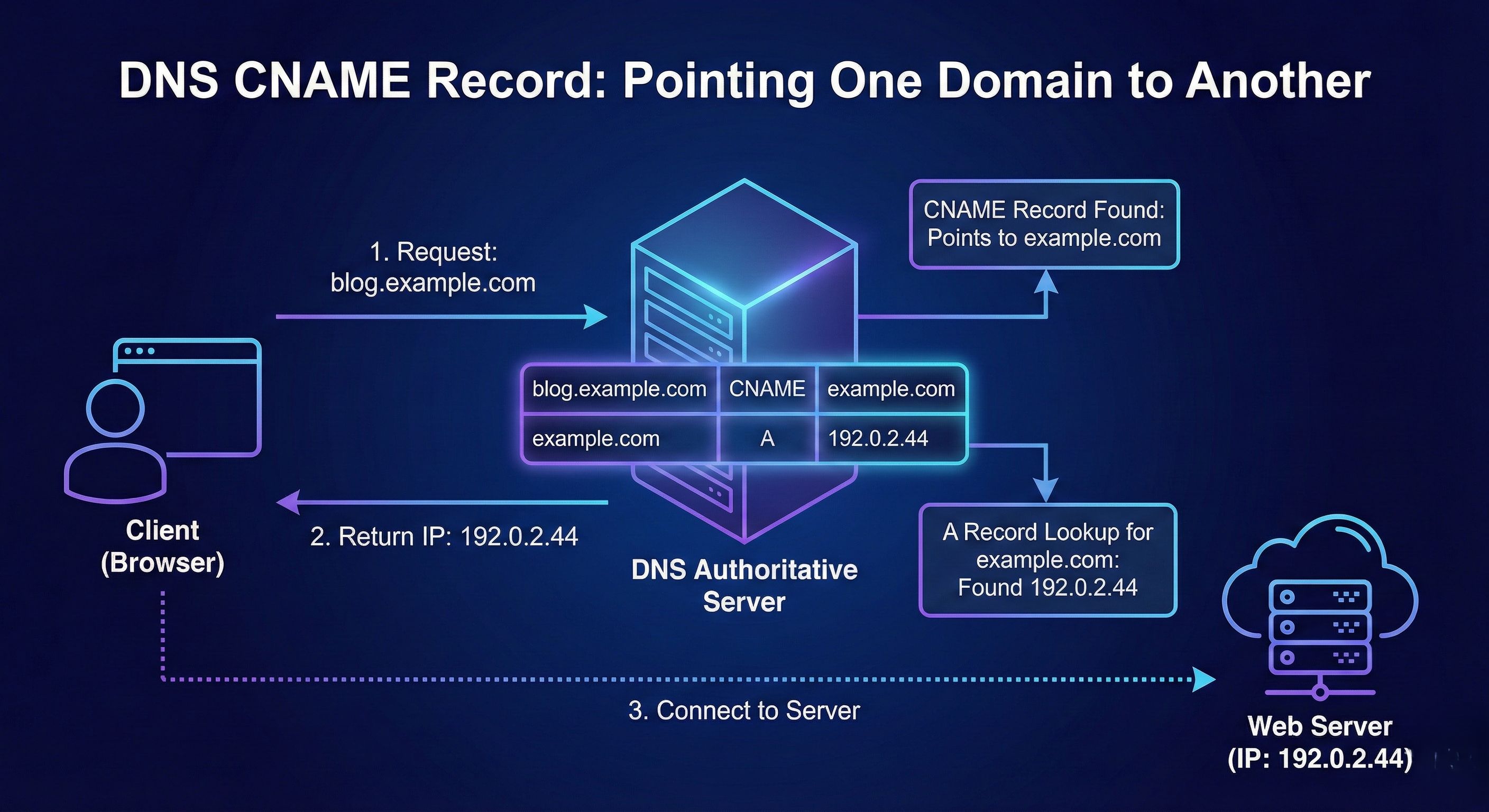
CNAME = Canonical Name
This record answers:
“This name is just an alias, the real name is something else.”
Example:
www.example.com → example.com
Real-life analogy:
Nickname → Real name
“Call me by this, but I live there”
Important rule:
CNAME never points to an IP
It always points to another domain name
MX Record (Where Emails Should Go)
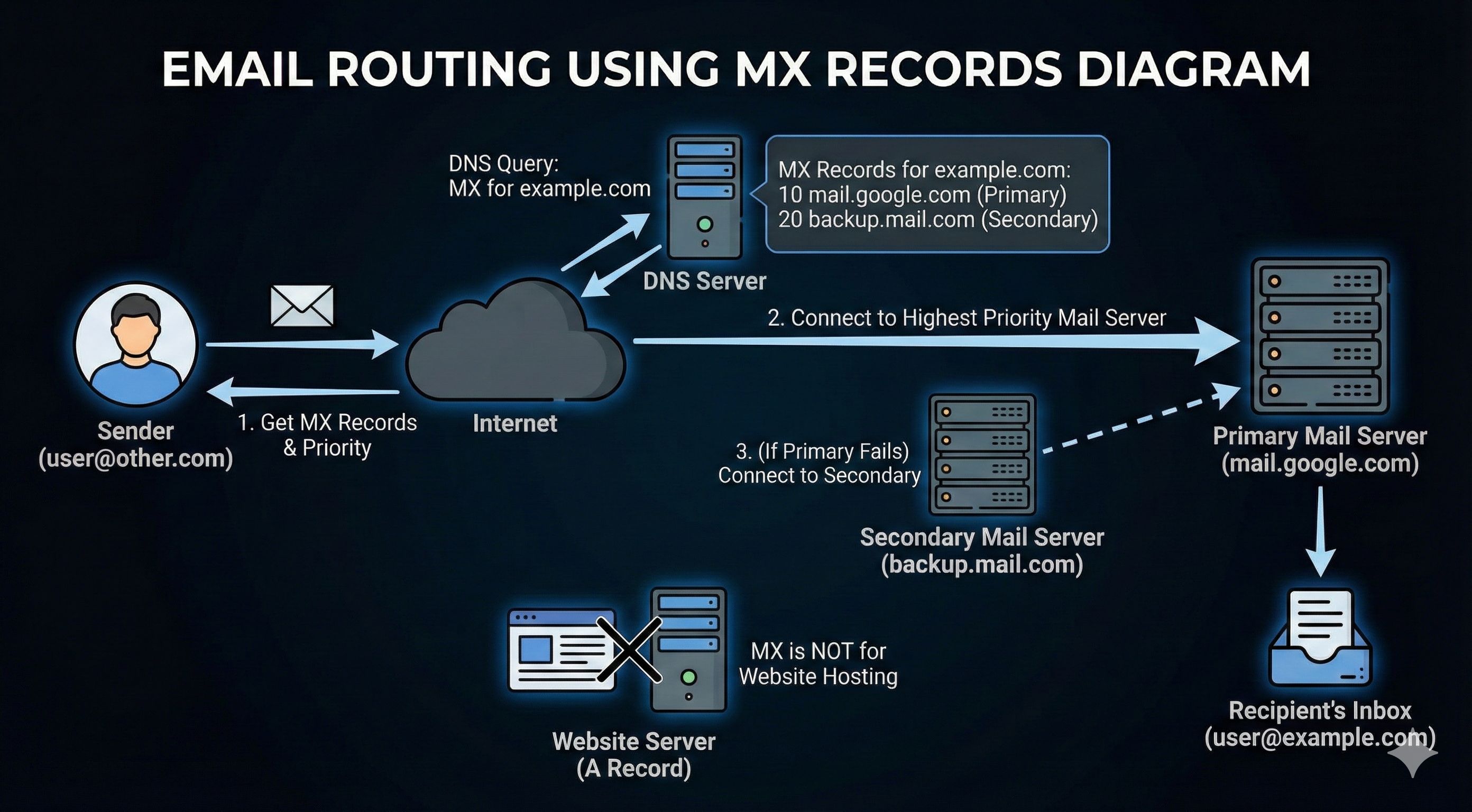
MX = Mail Exchange
This record answers:
“Where should emails for this domain be delivered?”
Example:
example.com → mail.google.com (priority 10)
Real-life analogy:
Website address ≠ Post office
Emails need a mail server
MX records:
Decide which mail server handles emails
Support priorities (backup mail servers)
Important:
MX has nothing to do with website hosting
It’s only for email
Common confusion:
NS → who manages DNS
MX → who handles emails
TXT Record: Extra Info & Verification
TXT records are flexible.
They answer:
“Here’s some extra information about this domain.”
Used for:
Domain ownership verification
Email security (SPF, DKIM, DMARC)
Service verification (Google, GitHub, etc.)
Example:
"v=spf1 include:_spf.google.com ~all"
Real-life analogy:
Sticky notes on a file
“Yes, I own this domain”
“These servers are allowed to send emails”
TXT records don’t control traffic,
they prove things.
How All DNS Records Work Together
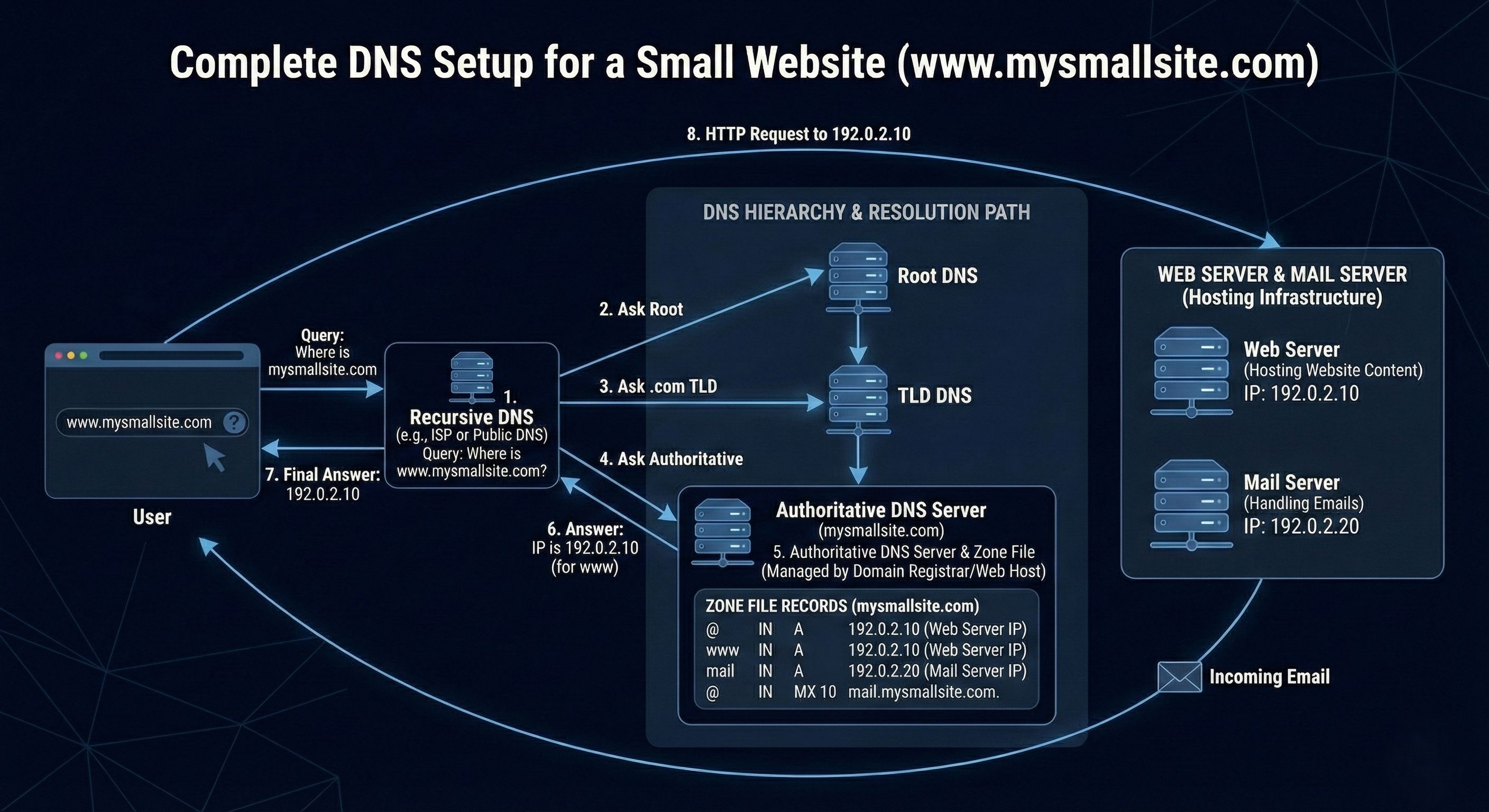
Let’s say you open:
https://www.mywebsite.com
Here’s what happens (simplified):
NS Record
- Tells which DNS server is responsible
CNAME Record
A / AAAA Record
mywebsite.com→ IP address
Browser connects to server
HTTP request sent
Website loads
MX Record
- Used only when someone emails
@mywebsite.com
- Used only when someone emails
TXT Record
- Used silently for verification & email security
All records work together
each doing one small job properly.
Final Mental Model
Think of DNS like a well-organized office:
NS → Reception desk
A / AAAA → Physical address
CNAME → Alias name
MX → Mail department
TXT → Notes & verification
No record replaces another.
They collaborate, not compete.


